
Welcome to Golf Savvy

Don’t wait another minute — check out what else Golf Savvy has to offer!
The Simple, Easy Real Time Golf Scoring App
The Mission Of Golf Savvy
At Golf Savvy, we wanted to make the managing and playing of a golf game simple, easy, and accurate for everyone, by offering a simple and user-friendly platform they can trust and use while on the golf course.
Features List
Simplified Golf Scoring is Just One Click Away
Golf Savvy is just what you’ve been looking for — a new app that gives players and game managers the chance to simplify scoring of your golf game with a few simple clicks. Our easy-to-use platform has a wide range of features that were created with an aim to help you manage and score a golf game with multiple players and teams. Some of the main features of Golf Savvy app are as follows:
-
Real time scoring where multiple players who are entered into the game can view and enter scores while on the course with their smart device.
-
Automatic calculations based on handicaps from the player handicap database, game parameters, and course and tee played.
-
Blind Draw Team leveling.
-
Reporting system which include display and/or print of blank score cards, game result score cards for each flight or team, and game results summary. All of these reports can be sent to players in an automated email.
-
Real time leaderboard that shows a comprehensive real time game in progress for each team, flight or individual player which can be viewed by anyone that logs into the app even if they are not a game player or manager.
-
Automated email invitations to the game players with a link to the app.
-
Score Posting report that lists all the players in a game with all with all info needed to post to the GHIN handicap system including their ESC scores.
-
Player database where users can add and edit player information either manually or by importing data from a file generated by the GHIN handicap system.
-
Course database where users can add courses and update course information.
Real Time on Course Scoring
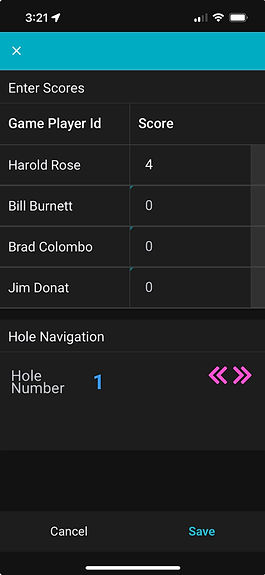
Real time scoring where multiple players who are entered into the game can view and enter scores at the same time while on the course.
Reports
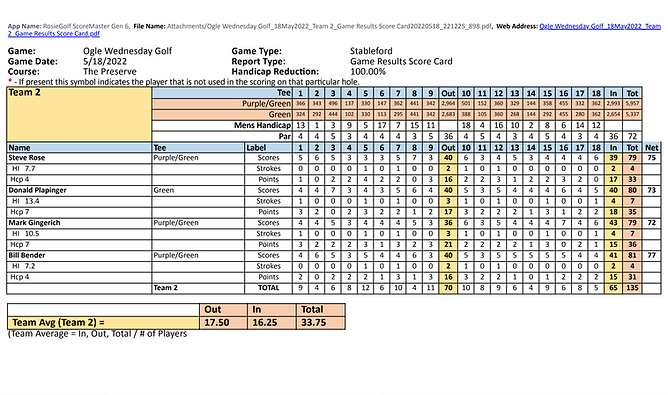
Golf Savvy report generator can generate 5 types of reports. 1) Score posting report. 2) Game results report. 3) Blank scorecards to fill out manually if desired. 4) Full leaderboard reports. 5) Send a game invitation to players. The reports are delivered as automated emails with attachments. See report examples below. Download Golf Savvy today and see what it can do for you.


Game Manager
Golf Savvy is the app game managers have always wanted but never knew existed up till now. The Game Manager allows anyone to create and manage their own games. There are 5 game types to choose from:
1) Better Net (i.e. Better Ball)
2) Stableford
3) Stroke Play
4) Quota
5) 3's 4's and 5's
The game manager selects the game type, adjusts the game parameters and then adds the players to the game by selecting them from the players database. Team leveling options are available such as a Blind Draw where teams that are short a player can have a blind draw player added using randomly selected players from the game for each hole.

Live Leaderboards
Golf Savvy has live realtime full leaderboards for any game in the system that can be viewed by anyone who logs into the app.

Frequently Asked Questions
When out on the golf course scoring a game how much time does it take to score a hole.
It only takes about 30 seconds to open the app when you get to the course. From there it takes only seconds to enter scores for each player in your flight. I do it on the way to the next tee after a hole is played.
How many golf courses are in your system and are they easily managed?
Currently there are only a few courses available in the Golf Savvy app. But anyone can open the app and add courses to the course database. It's possible in the future to get access to a large course database eliminating the need to enter courses. See the Golf Savvy Course Management Tutorial.
I’ve seen other mobile Apps that seem to use a lot of battery power. How much does your App use?
The Golf Savvy app uses very little power. I use typically no more than 20% of my battery on a typical day on the golf course scoring a complete game with my iPhone 13.
How is player information such as handicaps and GHIN information managed?
The Golf Savvy app contains a player database but is not directly connected to the GHIN handicap database. Currently anyone who is logged into the app can add and update players to the database manually whether they have a a GHIN handicap or not. However, there is a better faster way in which players can be managed using file import tool provided by the app. A file can be sent from the GHIN handicap database for your club on a daily basis and this file can be converted and uploaded to the app with just a few button clicks. See the Golf Savvy Player Handicap Management Tutorial.
I’ve seen other Apps that serve similar purposes. What makes yours different?
The Golf Savvy app is very straightforward and easy to use for game managers as well as players. It takes only minutes to create and setup a game and seconds to enter players scores for each hole played.